
Service · Tracking & analytics
Know which ads make money Tracking that shows which ads pay.
GA4, Google Tag Manager, Meta Pixel and Conversions API, Google Ads conversions and CRM data, set up so every lead and sale traces back to the ad that produced it.
By Mubeen Khan · Updated
The short answer
Conversion tracking records which ads, keywords and audiences produce leads and sales, and sends that data back to Meta and Google so their algorithms find more of the same buyers. Mubeen Khan sets up GA4, Google Tag Manager, the Meta Pixel with Conversions API, Google Ads conversions with enhanced conversions, and CRM offline conversions. It is the first step in every account he manages, because campaigns can only optimise for what they can measure.
- Purchases tracked in one Meta account
- 35,201
- Ad spend managed and measured
- $5M+
- Drop in Google Ads cost per conversion on one account
- -$18.10
- Step in every account I manage
- 1st
Why tracking decides your results
Meta and Google optimise for whatever you tell them is a conversion. If the Pixel misses half your leads, or counts page views as leads, the algorithm learns from the wrong people and your cost per customer rises. Browser privacy settings and ad blockers make browser-only tracking miss more each year, which is why server-side signals now matter.
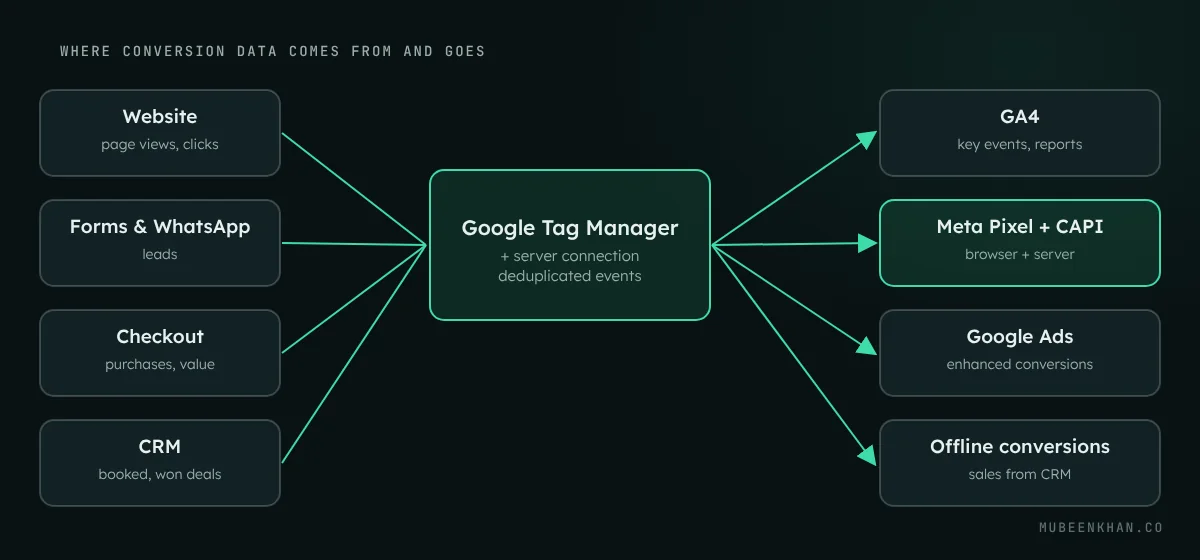
What I set up
GA4 and Google Tag Manager
A clean GA4 property with the events that matter (lead, booking, purchase, WhatsApp click, phone click) marked as key events, all managed through Google Tag Manager so changes do not need a developer.
Meta Pixel and Conversions API
The Pixel in the browser plus the Conversions API from the server, with event deduplication so each lead or purchase counts once. Good match quality helps Meta find buyers and report results more completely.
Google Ads conversions and enhanced conversions
Primary conversions for real outcomes, calls from ads and the website, and enhanced conversions using hashed customer data so Google can attribute more conversions accurately.
CRM and offline conversions
When the sale happens later, by phone or in person, the CRM sends the outcome back to Meta and Google. Campaigns then optimise for paying customers, not just form fills. Works with GoHighLevel and most CRMs.
Reporting
A simple dashboard of spend, leads, bookings, sales and cost per customer by channel, with consistent attribution across platforms, so decisions are made on revenue rather than clicks.
How a tracking setup runs
- Audit what fires todayI test every form, button, checkout and call link and compare what Meta, Google and GA4 record against your real leads and sales.
- Write the measurement planOne page listing each conversion, where it fires, its value and which platform optimises for it.
- Build in Tag Manager and on the serverTags, triggers, Conversions API and enhanced conversions, with consent settings respected.
- Test end to endTest leads and purchases are checked in each platform, including deduplication and values.
- Hand over and monitorYou get the plan and a dashboard; I watch for broken events after site or form changes.
Signs your tracking is broken
- Meta or Google report far more or far fewer leads than your CRM
- Every campaign shows the same cost per lead
- Purchases appear in Shopify but not in Ads Manager
- GA4 shows conversions as "(not set)" or direct traffic
- You cannot say which campaign produced last month's best customers

Tracking setup compared
| Pixel only (common) | Full setup | |
|---|---|---|
| Browser events | Yes | Yes |
| Server events (Conversions API) | No | Yes, deduplicated |
| Google enhanced conversions | No | Yes |
| Sales from CRM sent back | No | Yes |
| Decisions based on | Platform estimates | Real leads and revenue |
Proof from real accounts
Tracking questions
What is the Meta Conversions API?
The Conversions API sends conversion events, such as leads and purchases, from your server to Meta instead of only from the visitor's browser. Because it does not rely on browser cookies, it records conversions the Pixel misses and gives Meta better data to optimise your ads.
Is the Conversions API free?
Meta does not charge for the Conversions API. The cost is the setup and, for some methods, a server or integration tool. Shopify and GoHighLevel include built-in connections that reduce the setup work.
Do I need Google Tag Manager?
It is not required, but it makes tracking far easier to manage. Tags, events and changes are handled in one place without editing the website code each time.
How long does a tracking setup take?
A standard setup for one website, its forms and ad accounts usually takes one to two weeks including testing. Stores with custom checkouts or several CRMs take longer.
Will this work with cookie consent rules?
Yes. Consent settings are respected and Google Consent Mode can be configured, so tracking follows what each visitor has agreed to.
Can you fix tracking on an account another agency built?
Yes. Most of my tracking work starts with an existing account. I audit what is there, keep what works and rebuild what does not.